

Desktop alerts for Inbox chats assigned to you
Text Agents & InboxNewOct 19 – 25, 2026
Get a desktop alert when a chat is assigned to you or a customer replies on WhatsApp in one of your chats, even while you work in another tab.
You no longer have to keep the Inbox in front of you to catch a customer. The Inbox can send desktop alerts through your browser, so you know when a chat needs you while you work somewhere else.
When you get an alert
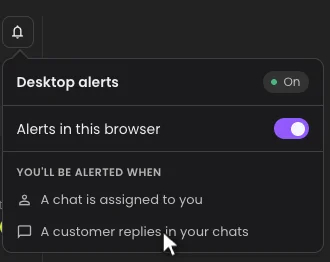
- When a conversation is assigned to you, except when you assign it to yourself.
- When a customer replies in a WhatsApp chat assigned to you, while a person handles it. Replies in website chats don't send alerts.
Turn them on
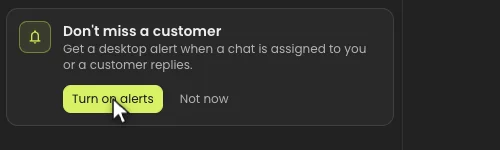
- Open Text Agents, then Inbox. The first time, a banner asks: Don't miss a customer.
- Click Turn on alerts, then Allow when your browser asks to show notifications.
- Use the bell beside your Online switch to check them, choose which of the two alerts you want, or turn off Alerts in this browser.
Click an alert to open that chat. If Dapta is already open, that tab switches to the chat.
Good to know
- Alerts are set per browser: turn them on in each browser where you answer chats.
- Signing out turns them off in that browser.
- The Dapta tab can be in the background, but alerts only reach you while your browser is open.
- Alerts come from the workspace where you last opened the Inbox in that browser.