

Three new models and reasoning effort for voice agents
Voice AgentsNewOct 5 – 11, 2026
Voice agents can run on GPT 6.1 Sol, GPT 6 Luna and GPT 5.6 Terra, and you choose how hard they think with Reasoning effort.
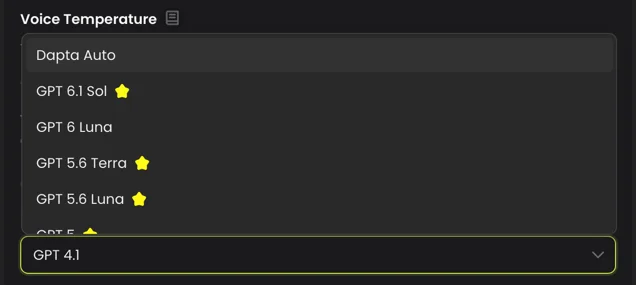
Three new models are available for voice agents: GPT 6.1 Sol, GPT 6 Luna and GPT 5.6 Terra. They appear in the LLM Model list right after Dapta Auto. Sol and Terra need a paid plan.
Reasoning effort
When you pick one of these three models, a Reasoning effort setting appears below it. It goes from None or Low, depending on the model, up to Maximum. More effort helps the agent with hard reasoning, but it adds latency to every answer. From High up, Dapta warns you that the caller may hear several seconds of silence before each response, so use those levels only when the agent really needs them.
Try it
- Open your voice agent and go to Settings, then Voice Settings.
- Under LLM Model, choose GPT 6.1 Sol, GPT 6 Luna or GPT 5.6 Terra.
- Set Reasoning effort, starting low.
- Save your changes.
Good to know
- Phone calls use the Reasoning effort setting. Web calls don't.
- Dapta Auto doesn't show Reasoning effort: Dapta sets it for you.
- Agents you already have keep their model until you change it.