

Connect WhatsApp Business to any text agent
Text Agents & InboxImprovedSep 28 – Oct 4, 2026
Every text agent workspace can connect WhatsApp through Meta, with a new number or the one already in the WhatsApp Business app, and see each number's health in one place.
Any workspace with text agents can now connect a WhatsApp number directly through Meta, from Channels. Use a new number, or the one you already use in the WhatsApp Business app: you keep using the app on your phone, and your agent replies from the same number.
Connect a number
- Go to Text Agents → Channels and, on the WhatsApp card, click View Connections. WhatsApp numbers opens.
- For your first number, click Continue with Meta. For another one, click Connect number, then Continue.
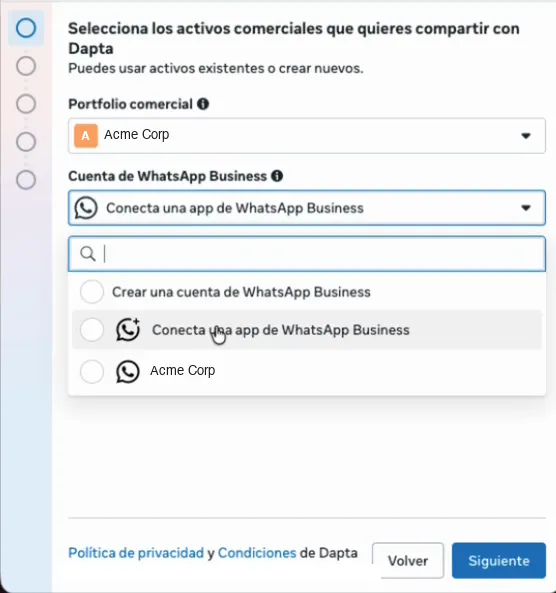
- In Meta's window, pick your business and your number. To keep the WhatsApp Business app on your phone, choose to connect the app and scan the QR code with it.
- Back in Dapta, choose the agent that answers the number.
One screen for all your numbers
The redesigned WhatsApp numbers screen lists each number with the agent that answers it (Answered by), whether the agent can reply (Agent replies) and whether you can send business-initiated messages (Business-initiated). When something is wrong, the number shows the one fix it needs.
Media and replies
Photos, voice notes, videos and documents your customers send reach the conversation, and the replies you send from the Inbox go out on these numbers.
Good to know
- Bought a number from Dapta? Click Book a session with Dapta and our team connects it with you.
- Dapta charges for the agent, in credits. Meta charges for delivering the messages, to the payment method on your own WhatsApp Business account.