

Set a reply timeout in hours and minutes
Text Agents & InboxNewAug 31 – Sep 6, 2026
Set how long a text agent waits before closing a quiet conversation in hours and minutes, instead of counting it all in minutes.
A text agent closes a conversation when the contact stops replying for a while. You used to type that wait as one number of minutes, so a day had to be written as 1440. Now Close after no reply for has separate Hours and Minutes fields, so a day simply reads 24 hours.
How it works
- Open your text agent and go to its Settings tab.
- Open Conversation behavior.
- In Close after no reply for, enter the Hours and Minutes. For example, 1 hour and 30 minutes for a 90-minute timeout.
- Click Save Agent, then publish the agent.
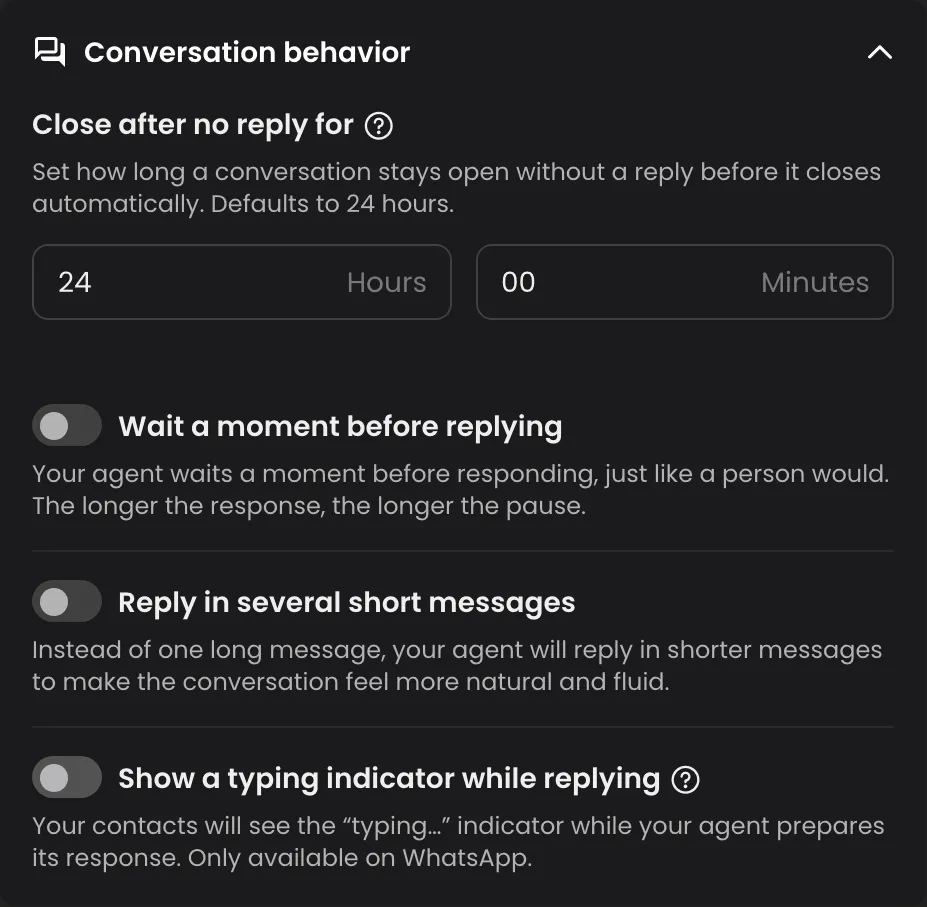
The three switches below it, Wait a moment before replying, Reply in several short messages and Show a typing indicator while replying, now each sit on their own row with their description, so it's clear what each one does.
Good to know
- The minimum is still 10 minutes, and the default is 24 hours.
- Agents created from now on start with Reply in several short messages and Show a typing indicator while replying on. Agents you already have keep their settings.
- The timeout can't be shorter than your longest follow-up delay.