

Find conversations awaiting a first reply
Text Agents & InboxNewSep 7 – 13, 2026
See the chats your business started that the contact hasn't answered yet, with their own Inbox filter, and find them in chat history and exports too.
When your business starts a conversation, for example with a template from a sequence, it can sit there waiting for the contact's first reply. Those chats now have their own status, Awaiting first reply, so you can find them in the Text Agents Inbox and they no longer go missing from your records.
How to find them
- Open the Inbox in Text Agents.
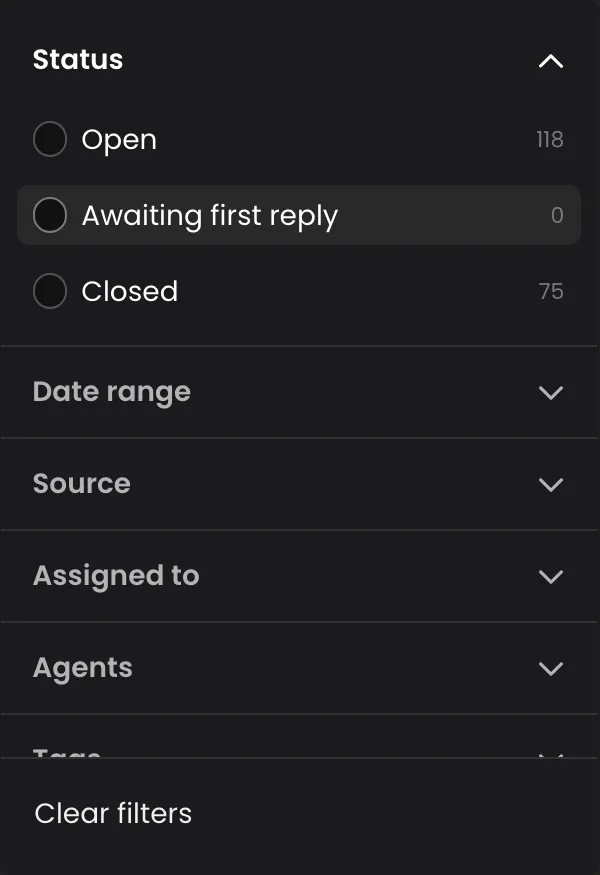
- Click the filter button and open Status.
- Choose Awaiting first reply. Hover over it to read what the state means.
- Click Clear filters to go back to every conversation.
When you open one of these conversations, a banner explains it: the conversation was started by your business and is awaiting the contact's first reply. As soon as the contact answers, it becomes an open conversation.
In history and exports
These conversations also appear by default in chat history and in exports. A conversation that opened and then stalled is no longer missing from the record, so your reports count every chat your business started.
Good to know
- An awaiting conversation is read-only in the Inbox: there is nothing to reply to until the contact writes back.
- A template that was sent is not the same as a reply. Use this status to see who still hasn't answered.