

Dapta Auto, the model Dapta manages for your agents
Voice AgentsNewOct 5 – 11, 2026
Pick Dapta Auto once and Dapta chooses, tests and updates the model behind your text and voice agents, so you never compare models again.
Dapta Auto is a model choice for text agents and voice agents. Dapta picks the model behind it, tests it and keeps it up to date. When Dapta moves it to a better model, every agent on Dapta Auto gets the change and you don't touch anything. Your agent and its prompt stay as they are.
On a text agent
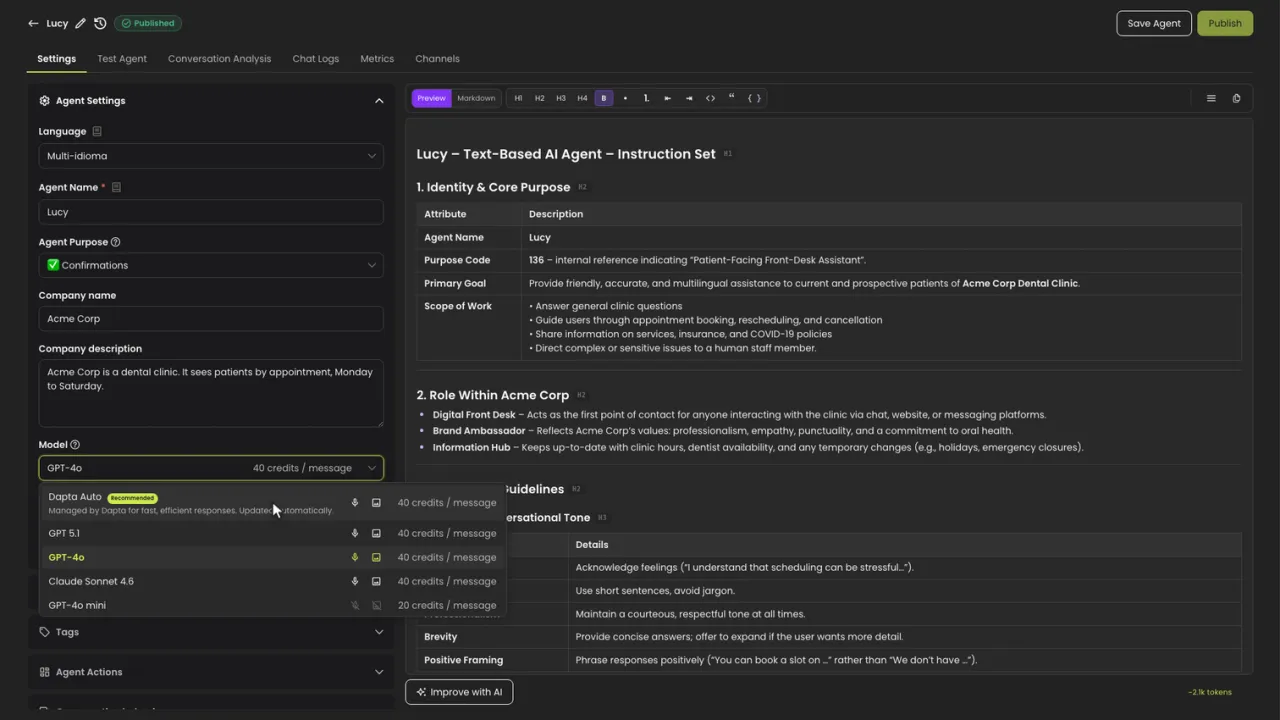
New text agents start on Dapta Auto. It costs 40 credits per message, and it reads the images and voice notes your customers send. To move an agent you already have:
- Open the text agent and go to Settings.
- Click Model and choose Dapta Auto, the first option, marked Recommended.
- Click Save Agent, try a few real questions in Test Agent, then click Publish.
On a voice agent
- Open the voice agent and go to Settings.
- Open Voice Settings, click LLM Model and choose Dapta Auto.
- Click Save changes and make a few test calls.
Your calls keep the same per-minute rate.
Good to know
- Agents you already have keep their model until you switch them. Nothing changes by itself.
- Dapta doesn't show which model is behind Dapta Auto. If your company only approves certain AI providers, pick that model from the list instead.
- A new model can phrase things differently, so test the conversations that matter before your customers see the change.